Fix Layout Problems in AI-Generated HTML Slides
Adjust overflowing text, misplaced images, and slide order without regenerating your presentation. Make a focused visual edit, then save the revised deck.
Start with a saved HTML presentation. Text inside a screenshot or image cannot be edited as ordinary slide text.
Executive Overview & Delivery Architecture
Direct in-place text adjustments, typography control, and local asset insertion for AI-generated presentations.
Pure HTML retention
Bounded typography
Single-file HTML
Properties
Selected: Heading Block
Workflow
Find the Issue, Make the Edit, Check the Result
Work on the part that needs attention, then review the slide before saving.
Open the HTML deck
Upload your file and select the slide with the problem.
Adjust the selected content
Edit copy, change text size, position an image, or reorganize slide pages.
Save and review
Export revised HTML or PPTX, then open the file to check the changes.
One focused edit
Change the heading. Keep the rest of the slide.
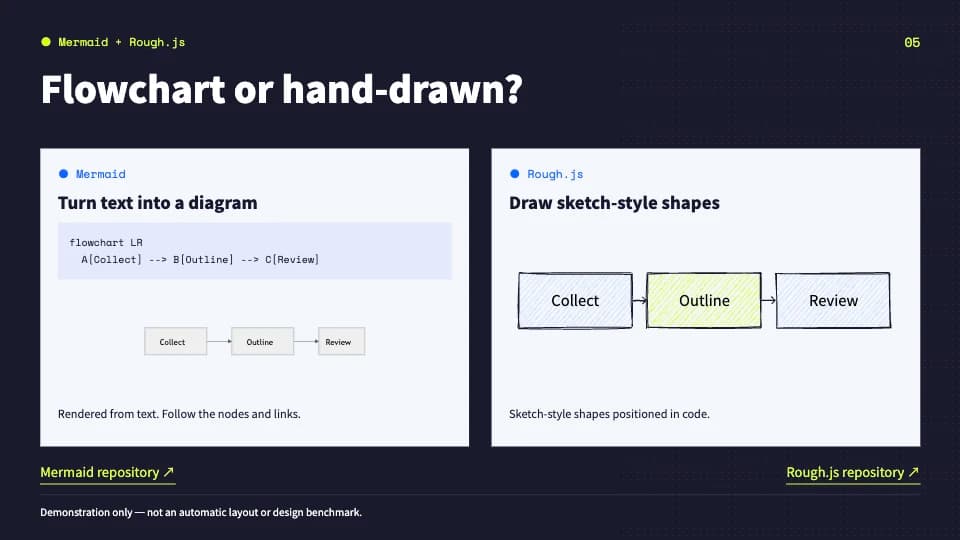
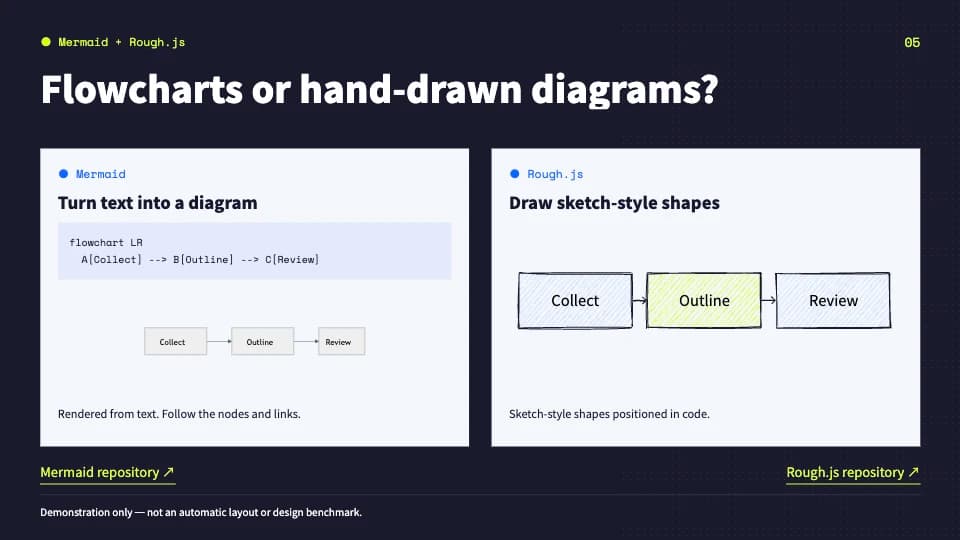
This example changes “Flowchart or hand-drawn?” to “Flowcharts or hand-drawn diagrams?” in the actual editor. The diagrams and other slide content stay in place.
Step-by-step guide
How to Fix Text Overflow and Image Placement in HTML Slides
Keep the original HTML file as your reference. Make one focused change, inspect the slide, and reopen the exported file to check the result.
- 01
Find the editable content
Select the affected slide and click the heading or paragraph. If the words are inside a screenshot or diagram image, use the original text source; the editor does not turn image pixels into editable text.
- 02
Fit an overflowing heading
Shorten the copy or reduce the selected text’s font size until it fits. Fit slide text reduces text size across the current slide, so check the other text afterward. Persistent clipping from a container or complex CSS needs a source-layout change.
- 03
Reposition an image or covered element
Select the image and drag, resize, or nudge it while checking nearby text. For text or a content block, choose Move selected element first. Use Select covered element when another layer hides the item, and check the preview before making another adjustment.
- 04
Check the saved result
Choose Export HTML, reopen the download, and browse every slide. Re-import it to continue editing. If you need PowerPoint, export PPTX too and inspect the changed slide there. Download your files before refreshing or closing the editor.
Practice with the same downloadable deck
Better Codex Designs is our eight-slide English example about open-source design resources. The layout-fix page shows an actual heading edit, and the editability guide pairs its HTML with the exported PPTX.
Explore the HTML slide editor · Inspect the exported PPTX example
Why this workflow
A Small Layout Problem Needs a Focused Fix
When the draft is already useful, you may only need to shorten a title, move an image, or reorder two pages.
- Change the text you actually need to update.
- Use visual controls for size and position.
- Review the result instead of assuming every layout issue is fixed.
Practical example
Start with an Overflowing Title
Select the title and adjust its copy or font size. Fit text can reduce oversized text on the current slide.
Check which text is causing the overflow.
Shorten the copy or reduce its font size.
Review other text on the slide before saving.
Capabilities
Common HTML Slide Fixes
Choose a fix supported by the editor, rather than requesting a new deck.
Text that runs out of space
Shorten a heading, change its size, or use Fit text. Dense layouts may still need source changes.
An image in the wrong place
Select a supported image, resize it, and drag or nudge it into position.
Slides in the wrong order
Use the thumbnail rail to reorder, duplicate, add, or remove pages.
Inconsistent text styling
Adjust font size, emphasis, or color on the selected text.
A distracting solid fill
Change supported background colors. Text or colors baked into an image are not separately editable.
A reusable result
Export the revised HTML for later editing, or export static PPTX for PowerPoint handoff.
Use Cases
When to Return to the Source HTML
Some problems require a change to the file rather than another canvas adjustment.
Important content is drawn by a script, chart runtime, or canvas rather than stored as HTML text.
The page structure or complex CSS prevents the intended slide layout from importing correctly.
An inaccessible remote asset needs to be replaced, or a screenshot needs its original editable source.
Process your deck in your browser
Open, edit, and export your HTML file without sending the deck to a conversion server. No account is required. Remote images or fonts referenced by your HTML may still request their original hosts.
Read our Privacy PolicyFAQ
Fixing AI-Generated HTML Slides: FAQ
Know which adjustments are visual and which need a source-file change.
Does Fit text automatically fix every overflow?
No. It reduces text size on the current slide. Check the result; you may also need to shorten copy, adjust individual text, or change the source layout.
Can I edit words inside a slide screenshot?
No. A screenshot is an image. This editor does not perform OCR or reconstruct image text as editable objects.
Can I fix a deck from any AI tool?
The file structure matters more than the tool name. Bring a supported single-file HTML deck; native PPTX files and script-dependent applications are different inputs.
Will edits stay if I refresh the page?
Download the revised HTML before leaving or refreshing. Editing takes place in the current browser session; there is no cloud account saving your deck.
Can I still export PowerPoint after fixing the HTML?
Export PPTX creates a static PowerPoint file. Supported text and shapes remain editable; some graphics become images. Fonts may be substituted, and scripts and animations are not included. Check the result in PowerPoint before sharing.
Make the Fix Your HTML Slides Need
Open your existing deck and adjust the text, images, or page order.