See What You Can Edit in the Exported PowerPoint
Learn how to check editable text, shapes, and images in an exported PPTX. Try an HTML deck, inspect the result in PowerPoint, and decide whether it meets your needs.
The editor opens HTML files. Inspect the downloaded PPTX in PowerPoint; it cannot be imported back into this editor.
Executive Overview & Delivery Architecture
Direct in-place text adjustments, typography control, and local asset insertion for AI-generated presentations.
Pure HTML retention
Bounded typography
Single-file HTML
Properties
Selected: Heading Block
Workflow
Export, Inspect, and Reopen the Result
Use a sample HTML deck or your own file. Check the output in the application your audience will use.
Export a PPTX
Open an HTML deck in the editor and choose Export PPTX. Keep the original HTML as a reference.
Inspect the slide objects
In PowerPoint, try editing text and moving shapes. Selecting an image is different from editing the words inside it.
Save and reopen
Save your PowerPoint changes and reopen the file. Review all slides before handing it to someone else.
Inspect a real export
Compare the HTML with its exported PPTX
Slide 5 from the same English Codex deck, exported with SlideBeaver. Download the files and check the text boxes and images in your own presentation app.
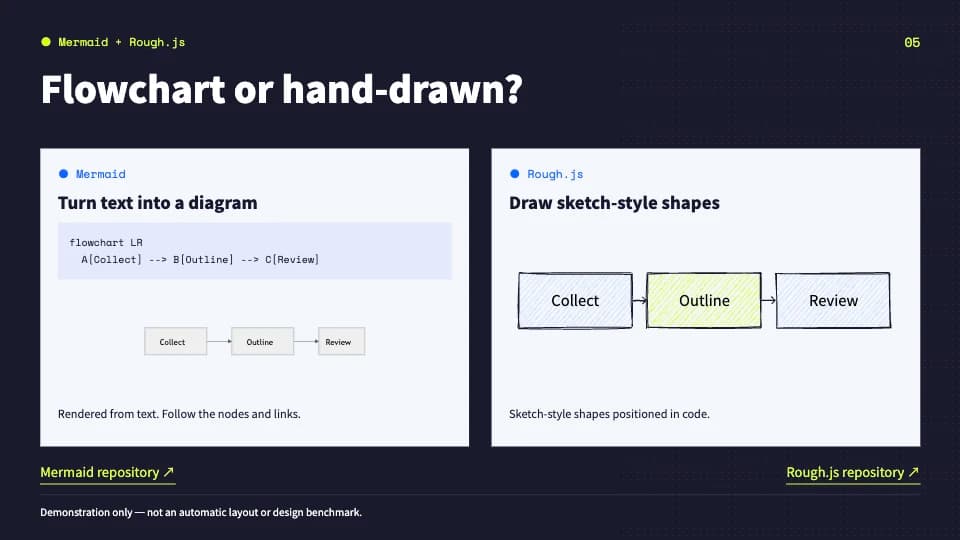
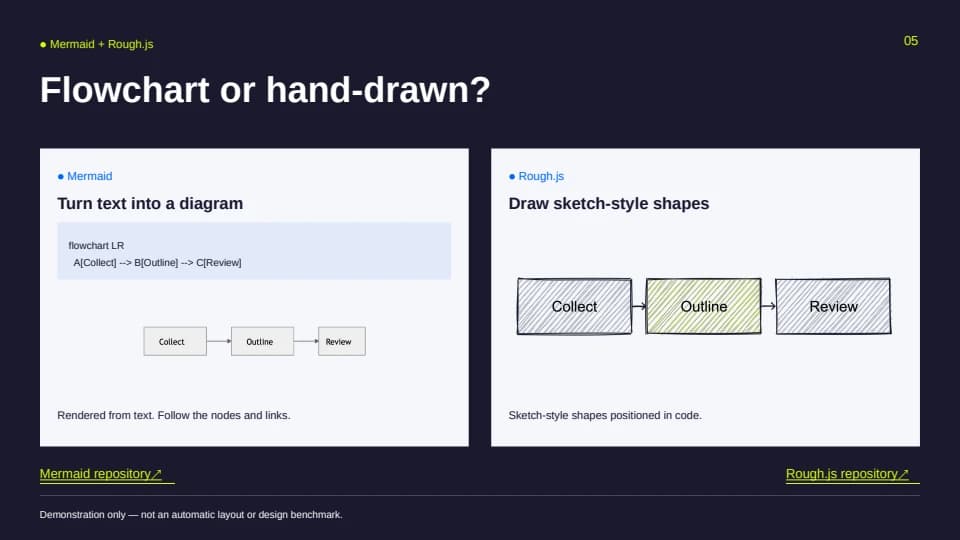
This preview was rendered by LibreOffice. Fonts and spacing can differ in PowerPoint. The file contains editable text boxes alongside images; inspect the elements you need before sharing it.
Why this workflow
A Selectable Image Is Not Editable Text
PowerPoint can select and resize an image without making its contents editable. Check the actual objects in the exported deck.
- Look for a text cursor inside a heading or paragraph.
- Try editing a supported shape separately from nearby content.
- Compare the result with the original HTML slide.
Practical example
Check One Slide, Then the Whole Deck
Use this inspection sequence on your own export. It is a checking guide, not a claim that every HTML element has a native PowerPoint equivalent.
Change a word in an exported text box.
Move an object and check how overlapping elements behave.
Save, reopen, and review fonts and line breaks across the deck.
Capabilities
What to Check in the Exported PPTX
Supported text and shapes can remain editable. Check each object type rather than judging only by its appearance.
Text boxes
Try placing a text cursor and changing a word. Text that was already part of an image cannot be edited this way.
Shapes
Select and move supported shapes independently. Complex visuals may be exported as images.
Images
Images can be selected and resized as images; their internal labels or artwork are not separate editable objects.
Fonts and line breaks
Fonts are not embedded. Substitutions and fonts available on the destination computer can change wrapping.
Static visual effects
Scripts and animations do not run in the PPTX. Check the static result instead of expecting browser behavior.
The saved file
Reopen the file after a text or object edit. Confirm the change persists and inspect the other slides.
Use Cases
Decide Whether the Output Fits Your Handoff
A useful check ends with a decision about your actual presentation, not just a successful download.
Can the person receiving the deck edit the text and objects they need to change?
Do the fonts, line breaks, and images look acceptable on the presentation computer?
Have you kept the source HTML for changes that still need the original layout?
Process your deck in your browser
Open, edit, and export your HTML file without sending the deck to a conversion server. No account is required. Remote images or fonts referenced by your HTML may still request their original hosts.
Read our Privacy PolicyFAQ
PowerPoint Editability FAQ
Understand the difference between an editable object, a rendered image, and a finished handoff.
Does the exported PPTX make every element editable?
No. Supported text and shapes remain editable, while some graphics are images. A successful export does not establish that every source element is a native PowerPoint object.
How can I tell whether text is actually editable?
Open the PPTX in PowerPoint, click into the text, change a word, and save. If you can only resize a picture, its contents are not editable text.
Why do some visuals become images?
HTML and PowerPoint use different layout and drawing models. Some visual elements are preserved as images rather than reconstructed as native objects. Inspect the actual output instead of assuming a fixed rule for every CSS effect.
Can I check a built-in sample before using my file?
Yes. Open the sample in the editor, export it to PPTX, and inspect that file in PowerPoint. A sample is a starting point; also check your own deck because its content and styles may differ.
Can I upload the PPTX here for more editing?
The input must be an HTML presentation file. SlideBeaver does not import native .ppt or .pptx files, turn screenshots into editable text, or generate a presentation from a prompt.
Does the browser preview prove how PowerPoint will render it?
No. The preview shows the HTML. Check the exported PPTX in PowerPoint, including fonts and the target device, before presenting.
Try the Workflow with Your Own HTML Deck
Export a PPTX, check what you can edit, and keep the source HTML for future changes.