HTML slide prompt
General HTML presentation prompt
Turn a brief or rough notes into a clear deck with one message per slide.
Build your brief
Start here when you have the information but need a presentation structure. The prompt separates the main message, supporting evidence, and next action. Supply your own figures: it explicitly asks the AI to flag missing data instead of making the briefing sound more certain than your notes.
What to provide
- [TOPIC]
- The subject and central messageExample: Quarterly product review: focus on activation
- [AUDIENCE]
- Who will read or hear the deckExample: Product and engineering leads
- [NOTES]
- Your facts, evidence, and source materialExample: Research observations, decisions, and owners
- [SLIDE_COUNT]
- Desired number of slidesExample: 4
- [LANGUAGE]
- Language for all slide copyExample: English
Output: A single-file HTML presentation with visible 16:9 slide sections.
Replace the bracketed fields with your own brief and source material.
From prompt to presentation
01Prepare the brief
Replace every bracketed field. Paste your actual notes, facts, and desired slide count; include sources for any numbers you want to show.
02Generate outside SlideBeaver
Paste the prompt into an AI chat or a coding agent. Ask for the complete HTML file, then open it locally and check every slide.
03Save and polish
Save the returned code as an .html file. On a desktop, open SlideBeaver, upload it, and adjust text, images, or slide order.
04Check the deliverable
Export HTML or a static PPTX. Reopen the file and inspect line breaks, fonts, and any visual that must remain editable.
Example: A clearer quarterly review
An original four-slide example using illustrative project notes. The figures and tasks are sample content. Use it to inspect the structure; your AI output may differ.
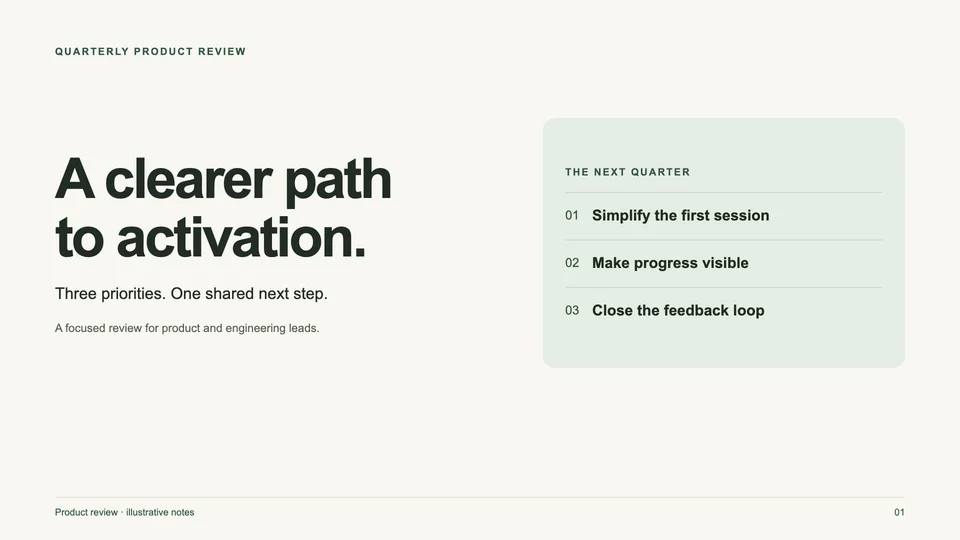
See the example brief
Audience: product and engineering leads. Four slides: a focus on activation, three research signals, three priorities, and a 30-day action plan. English; warm paper and muted green.
Before you import into SlideBeaver
- The supplied example uses visible slide sections, inline CSS, and system fonts. AI-generated variations still need their own import check.
- SlideBeaver exports a static PPTX. Supported text and shapes can stay editable; complex visuals may become images, and animations are not carried over.
- For missing or clipped content, ask the AI to remove runtime-dependent visibility and split dense slides before uploading again.
Have your HTML file ready?
Open the editor on desktop, upload your deck, and polish it before export.